9.9k Star!Claude Code 必装插件,帮你盯着 AI

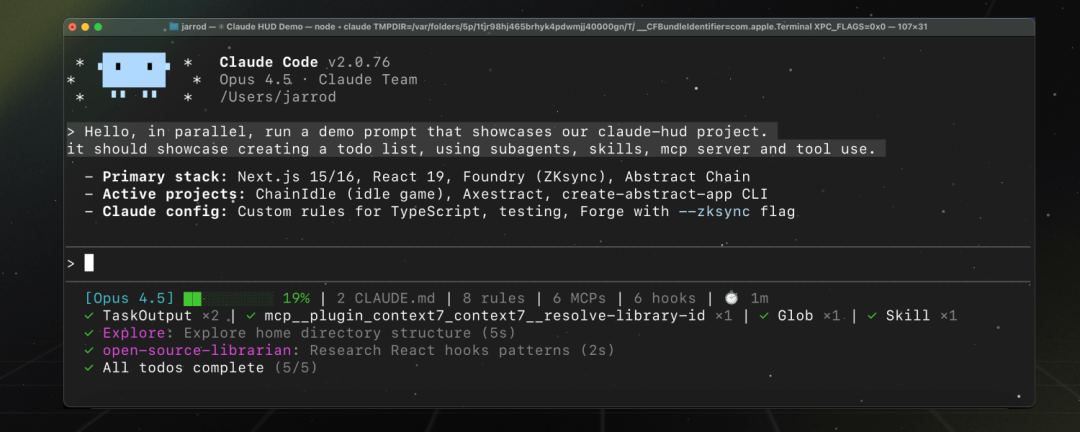
是什么Claude HUD 是一个 Claude Code 插件,在终端底部显示多行状态栏。
是什么
Claude HUD 是一个 Claude Code 插件,在终端底部显示一行状态栏,让你实时看到:
- • 上下文用量(别等到爆了才知道)
- • 正在调用的工具
- • 运行中的 Agent
- • Todo 进度
一句话:知道 AI 在干什么。
仓库:https://github.com/jarrodwatts/claude-hud
许可证:MIT
Star:9.9k(截至发稿)
为什么需要
用 Claude Code 的都知道,AI 在干活的时候你只能干等。
它说”让我看看代码”,然后你就看着光标闪烁。它在读什么文件?调用了多少次工具?上下文用了多少?你一概不知。
Claude HUD 把这些信息直接显示在终端底部,一目了然。
要求
Claude Code v1.0.80+
Node.js 18+ 或 Bun
安装
启动 Claude Code 会话,依次执行:
添加插件市场
1 | `/plugin marketplace add jarrodwatts/claude-hud` |
安装插件
1 | `/plugin install claude-hud |
初始化状态栏
1 | `/claude-hud:setup` |
完成!重启 Claude Code,HUD 就会出现在终端底部。
自定义配置
交互式配置
1 | `/claude-hud:configure` |
AI 会通过问答引导你开启/关闭各项显示。
手动配置
直接编辑配置文件:~/.claude/plugins/claude-hud/config.json
完整配置表:
1 | `{ |
配置详解
布局模式(lineLayout)
- • expanded(默认):多行显示,信息完整
- • compact:单行紧凑显示
路径深度(pathLevels)
控制项目路径显示几级目录:
pathLevels
效果
1
my-project git:(main)
2
apps/my-project git:(main)
3
dev/apps/my-project git:(main)
Git 状态选项(gitStatus)
选项
作用
showDirty
显示 * 表示有未提交更改
showAheadBehind
显示 ↑2 ↓1 表示领先/落后远程几条提交
showFileStats
显示文件变更统计 !3 +1 ?2(修改/新增/未跟踪)
显示元素(display)
选项
作用
showTools
实时显示工具调用状态
showAgents
显示子 Agent 运行状态
showTodos
显示任务完成进度
showDuration
显示会话时长
showUsage
显示用量限制(需 Pro/Max/Team)
showSpeed
显示输出 token 速度
颜色主题(colors)
选项
作用
可选值
context
上下文进度条颜色
red, green, yellow, magenta, cyan, brightBlue, brightMagenta
usage
用量进度条颜色
同上
warning
警告颜色
同上
usageWarning
用量警告颜色
同上
critical
严重警告颜色
同上
缓存设置(usage)
选项
作用
默认值
cacheTtlSeconds
用量 API 成功响应缓存时间
60 秒
failureCacheTtlSeconds
失败后重试间隔
15 秒
注意
- • 用量显示仅支持 Claude Pro/Max/Team 订阅,API 用户无此功能
- • AWS Bedrock 模型会隐藏用量显示
- • 如果用量不显示,确认你登录的是订阅账号而非 API Key
如果你觉得这篇文章对你有帮助,记得点赞、分享、关注,万分感谢!
本文转载自微信公众号,如有侵权请联系删除。
- 标题: 9.9k Star!Claude Code 必装插件,帮你盯着 AI
- 作者: lxiol
- 创建于 : 2026-04-19 22:03:34
- 更新于 : 2026-06-30 17:05:34
- 链接: https://blog.lxiol.cn/2026/04/19/99k-StarClaude-Code-必装插件帮你盯着-AI/
- 版权声明: 本文章采用 CC BY-NC-SA 4.0 进行许可。