大模型安排上翅膀-fastmcp

lxiol
📝
FastMCP 是构建 MCP 应用程序的标准框架

原文链接:https://mp.weixin.qq.com/s/3KaAhEBYNVO0AZY54SCMdw

  1. FastMCP 是构建 MCP 应用程序的标准框架。
  2. MCP它经常被描述为”AI 的 USB-C 接口”,提供了连接 LLM 与其可用资源的统一方式。

fastmcp来了,使用python丝滑构建mcp应用喽

git地址

git仓库

地址

主要功能

star/fork数

版本号

fastmcp

PrefectHQ/fastmcp

专注于MCP快速实现

24k /2k

v3.1.0

本文目录

1
2
3
4
5
6
7
8
9
10
11
12
`1 fastmcp仓库介绍
    1.0.1 功能说明
    1.0.2 dem0
2.1 fastmcp组件介绍
    2.1.1 fastmcp构成
    2.1.2 服务端-servers
    2.1.3 服务端-skills
    2.1.4 客户端-client
    2.1.5 服务端-apps
2 其他
    2.1 agent skills vs mcp
    2.2 环境说明`

fastmcp介绍

功能说明

  • 项目是干啥的

  • FastMCP 是构建 MCP 应用程序的标准框架。

  • 高级 MCP 模式(服务器组合、代理、OpenAPI/FastAPI 生成、工具转换)、企业级认证(Google、GitHub、Azure、Auth0、WorkOS 等)、部署工具、测试框架和完整的客户端库。

  • 模型上下文协议(mcp)允许您构建服务器,以安全、标准化的方式向 LLM 应用程序公开数据和功能。它经常被描述为”AI 的 USB-C 接口”,提供了连接 LLM 与其可用资源的统一方式。
    您可以将其视为一个 API,但专门为 LLM 交互而设计。MCP 服务器可以:

    1. 通过 Tools 提供功能(类似 POST 端点;用于执行代码), 可以cache缓存
    1. 通过 Resources 公开数据(可以将其视为类似 GET 端点;用于将信息加载到 LLM 的上下文中)
    1. 通过 Prompts 定义交互模式(LLM 交互的可重用模板)
  • fastmcp通过大模型调用工具的时候,是分两步走的。首先基于输入和模型介绍选择工具;然后将输入和工具执行的结果提供给大模型生成最终结果。

  • 详细帮助文档,可参考 FASTMCP

  • 回复【fastmcp】获取git仓库地址

demo

    1. 运行server
1
2
3
4
5
6
`python test_server.py
fastmcp run test_server.py:mcp # 使用stdio运行服务器 
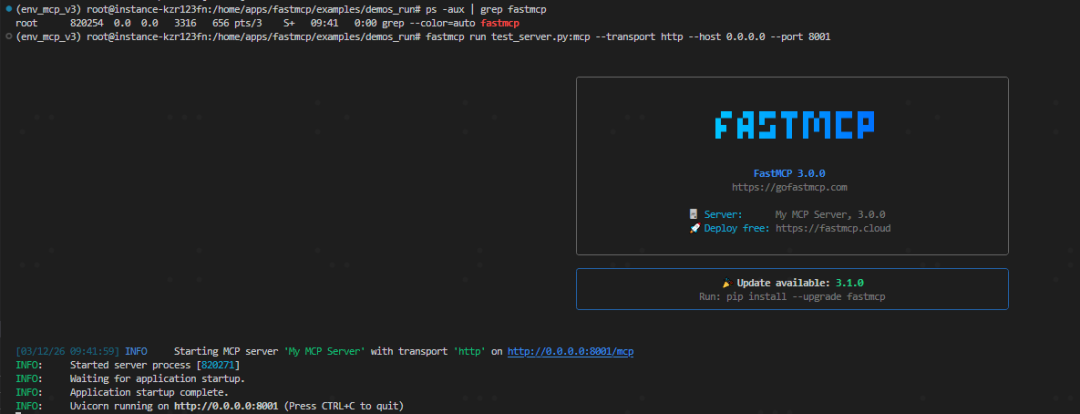
fastmcp run test_server.py:mcp --transport http --host 0.0.0.0 --port 8001  --reload --reload-dir ./   # 使用server运行服务器
fastmcp list http://0.0.0.0:8001/mcp # 打印指定服务有多少tools
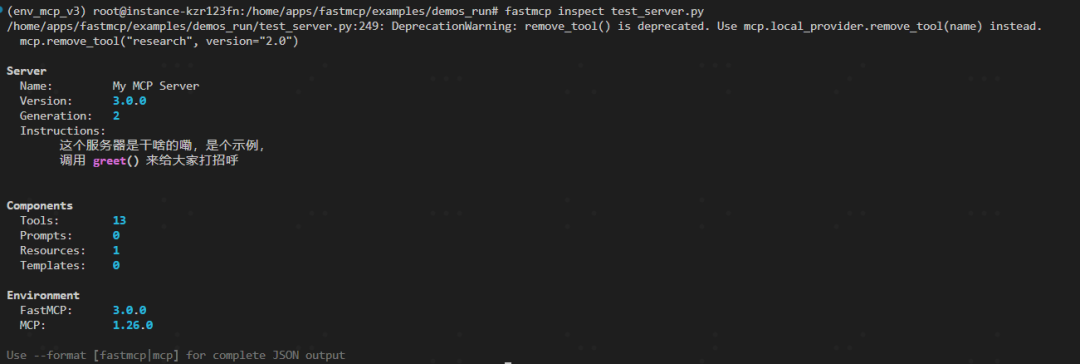
fastmcp inspect test_server.py # 打印某个server的信息
fastmcp run fastmcp.json --skip-env # 如果已经配置了config文件`

    1. 运行client
1
2
`from fastmcp import Client
client = Client("http://0.0.0.0:8001/mcp")`

    1. 基于FileSystemProvider实现团队开发,强烈推荐
  • 自动识别并加载文件夹下面的所有mcp组件,包括工具、提示词和资源,这个支持 reload 模式哦

  • 具体demo,可参考 文件系统mcp provider

  • 建议文档结构如下,

1
2
3
4
5
6
7
8
9
10
11
12
13
14
15
`mcp_providers/
├── tools/
│   ├── greeting.py      # @tool functions
│   └── calculator.py    # @tool functions
├── resources/
│   └── config.py        # @resource functions
└── prompts/
    └── assistant.py     # @prompt functions

# or 

mcp_providers/
├── user_management.py   # @tool, @resource, @prompt for users
├── billing.py           # @tool, @resource for billing
└── analytics.py         # @tool for analytics`

fastmcp组件介绍

fastmcp构成

模块名称

主要功能

服务器 (Servers)

将 Python 函数封装为符合 MCP 标准的工具、资源和提示词。

客户端 (Clients)

连接到任何支持 MCP 的服务器。

应用程序 (Apps)

为工具提供可直接在对话中渲染的交互式 UI。

服务端-servers

    1. 啥是服务端
  • 服务端(器)用于构建具有工具、资源和提示的 MCP 应用程序的核心 FastMCP 服务器类

  • 结合实例化 FastMCP 的类mcp和 mcp.tool 装饰器来实现

  • 运行 FastMCP 服务器的最简单方法是调用其 run() 方法

  • 可以选择不同的传输方式,例如用于本地服务器的 stdio,或用于远程访问的 http

1
2
3
4
5
6
7
8
9
10
11
12
13
14
15
16
17
`from fastmcp import FastMCP

mcp = FastMCP(
    name = "My MCP Server",
    instructions="""
        这个服务器是干啥的嘞,是个示例,
        包含admin标签的组件并过滤已deprecated的组件,
        调用 greet() 来给大家打招呼
    """,
    include_tags={"admin"}, 
    exclude_tags={"deprecated"}
)

... 

if __name__ == "__main__":
    mcp.run()`
    1. FastMCP 服务器向客户端暴露如下几种类型的组件

组件名称

demo

功能说明

是否常用

工具
mcp.tool
将函数作为可执行tool暴露给您的 MCP 客户端

资源
mcp.resource("data://config")
将数据源暴露给MCP客户端,比如参数字典, data://config为资源的URI

资源模板
mcp.resource("users://{user_id}/profile")
将参数化的资源暴露给MCP客户端, 接受传参哦

提示词
mcp.prompt
将用于指导 LLM 的可重用消息模板暴露给MCP客户端

上下文
mcp.tool/resource/prompt
使用mcp的一次request会话中的上下文信息。每次mcp请求会接收1个新的上下文对象.

打标签打标签
@mcp.tool(tags={"public", "utility"})
组件可以在定义时使用 tags 参数进行标记,后续可根据标签有选择的暴露组件

自定义路由
mcp.custom_route("/health", methods=["GET"])
可以在 MCP 端点旁边添加自定义 Web 路由

    1. 服务端组件示例
1
2
3
4
5
6
7
8
9
10
11
12
13
14
15
16
17
18
19
20
21
22
23
24
25
26
27
28
`mcp = FastMCP("test", strict_input_validation=True)

@mcp.tool(
  name="tool name",
  description="自定义描述",
  tags={"public"},
  meta={"version": "1.2"}
)
def multiply(a: float, b: float) -> float:
    """将两个数字相乘。"""
    return a * b

@mcp.resource("data://config")
def get_config() -> dict:
    """提供应用程序配置。"""
    return {"theme": "dark", "version": "1.0"}

@mcp.resource("users://{user_id}/profile")
def get_user_profile(user_id: int) -> dict:
    """根据 ID 检索用户的个人资料。"""
    # URI 中的 {user_id} 被提取并传递给此函数
    return {"id": user_id, "name": f"User {user_id}", "status": "active"}

@mcp.prompt
def analyze_data(data_points: list[float]) -> str:
    """创建一个要求分析数值数据的提示。"""
    formatted_data = ", ".join(str(point) for point in data_points)
    returnf"请分析这些数据点:{formatted_data}"`
    1. 后台执行
  • 默认的 MCP 交互是阻塞的,长时间操作会卡住客户端。后台任务协议允许客户端立即获得一个任务 ID,随后可独立追踪进度和获取结果,从而提升用户体验。

  • 部署方式的话,有 内存和redis部署,其中生产级别部署建议redis后端满足后台任务执行

  • 三种执行模式如下,通过 TaskConfig 可精细控制。

执行方式

特点

是否默认

optional

户端可选择同步或后台执行

required

必须作为后台任务执行,否则报错。

forbidden

禁止后台执行。

    1. 组合服务器
  • 支持使用 import_server(静态复制)和 mount(实时链接)将多个服务器组合在一起。

  • 这允许您将大型应用程序组织成模块化组件或重用现有服务器。

1
2
3
4
5
6
7
8
9
10
11
`from fastmcp import FastMCP
import asyncio

main = FastMCP(name="Main")
sub = FastMCP(name="Sub")

@sub.tool
def hello(): 
    return "hi"

main.mount(sub, prefix="sub")`
    1. 代理服务器
  • 使用 FastMCP.as_proxy 充当任何 MCP 服务器(本地或远程)的代理,让您桥接传输或为现有服务器添加前端。

  • 具体demo,可参考 test_server_proxy

1
2
3
4
5
`from fastmcp import FastMCP, Client

backend = Client("http://example.com/mcp/sse")
proxy = FastMCP.as_proxy(backend, name="ProxyServer")
# 现在像使用任何 FastMCP 服务器一样使用代理`
    1. 依赖注入
  • FastMCP 框架的依赖注入系统,它允许你以简洁、声明式的方式向工具、资源和提示中注入运行时需要的各种值,从而保持代码的清晰和可测试性。

  • 依赖注入的核心思想是:你只需在函数参数中声明需要什么(通过类型注解如下面的Context类型或特殊默认值如CurrentContext()),FastMCP 就会在调用时自动提供这些值。这些“依赖参数”对客户端是不可见的,不会污染 MCP 接口的 schema。

  • 如下,为内置的开箱即用的依赖项

类型

定义

使用方式

MCP上下文 (Context)

用于记录日志、报告进度、访问资源等请求级别的操作

可通过 ctx: Context 注解或 CurrentContext() 获取

服务器实例 (FastMCP)

用于内省服务器本身的信息,如服务器名称。

通过 server: FastMCP = CurrentFastMCP() 获取。

HTTP请求信息

获取请求信息,这是更安全的选择,因为在非HTTP传输下会返回空字典,避免程序崩溃。

通过 headers: dict = CurrentHeaders() 获取。

认证与授权

获取经过验证的令牌对象

通过 token: AccessToken = CurrentAccessToken() 获取经过验证的令牌对象
自定义依赖
将任何可调用对象(同步/异步函数、异步上下文管理器)包装起来,其返回值即被注入

使用 Depends()实现

1
2
3
4
5
6
7
8
9
10
11
12
13
14
15
16
17
`from fastmcp import FastMCP
from fastmcp.server.context import Context
from fastmcp.dependencies import CurrentContext

mcp = FastMCP("Demo")

...

@mcp.tool
asyncdef my_tool(query: str, ctx: Context) -> str:
    await ctx.info(f"Processing: {query}")
    returnf"Results for: {query}"

@mcp.tool
asyncdef my_tool(query: str, ctx: Context = CurrentContext()) -> str:
    await ctx.info(f"Processing: {query}")
    returnf"Results for: {query}"`
  • 8. OpenAPI类模型支持

  • 忽视client是否有sampling的能力,支持工具直接将request发送给大模型

  • 直接就上本地大模型哦

  • 具体demo可参考 test_server

1
2
3
4
5
6
7
8
9
10
11
12
13
14
15
16
`# pip install fastmcp[openai]
from fastmcp.client.sampling.handlers.openai import OpenAISamplingHandler
from openai import AsyncOpenAI

llm_client = AsyncOpenAI(base_url = "本地url", api_key = "sk-key")

mcp = FastMCP(
    name = "My MCP Server",
    instructions="""
        这个服务器是干啥的嘞,是个示例,
        调用 greet() 来给大家打招呼
    """,
    tasks=TaskConfig(mode="optional"),
    sampling_handler=OpenAISamplingHandler(default_model="qwen3-32b", client = llm_client),
    sampling_handler_behavior="fallback",
)`

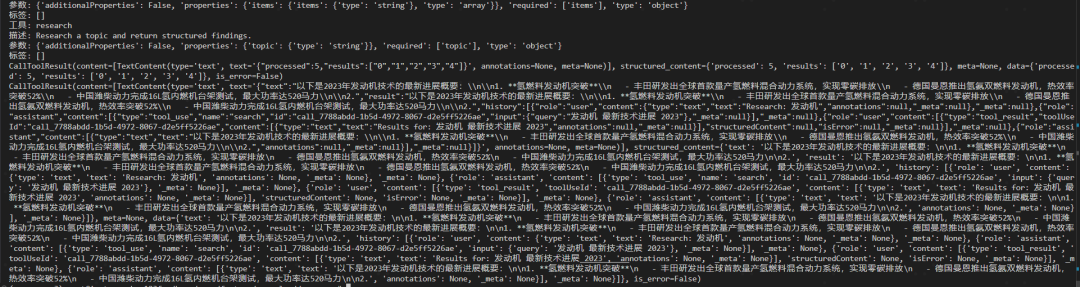
    1. 大模型调用
  • 基于sampleing实现,支持设置温度、模型列表、最长上下文、提示词等信息

  • text获取模型text结果;history获取全部历史信息交互

1
2
3
4
5
6
7
8
9
10
11
12
13
14
15
16
17
18
19
20
21
22
23
24
25
26
27
28
29
30
31
32
`from fastmcp import FastMCP, Context
mcp = FastMCP()

@mcp.tool
asyncdef technical_analysis(data: str, ctx: Context) -> str:
    """Analyze data using a reasoning-focused model."""
    result = await ctx.sample(
        messages=f"Analyze this data:\n\n{data}",
        model_preferences=["claude-opus-4-5", "gpt-5-2"],
        temperature=0.2,
    )
    return result.text or""

@mcp.tool
asyncdef contextual_analysis(query: str, data: str, ctx: Context) -> str:
    """Analyze data with conversational context."""
    messages = [
        SamplingMessage(
            role="user",
            content=TextContent(type="text", text=f"Here's my data: {data}"),
        ),
        SamplingMessage(
            role="assistant",
            content=TextContent(type="text", text="I see the data. What would you like to know?"),
        ),
        SamplingMessage(
            role="user",
            content=TextContent(type="text", text=query),
        ),
    ]
    result = await ctx.sample(messages=messages)
    return result.text or""`
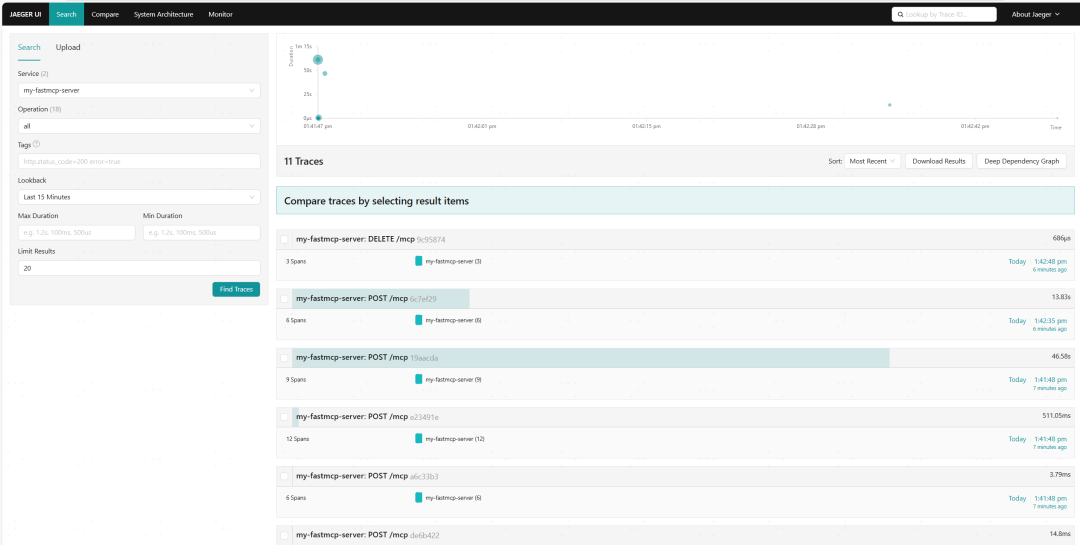
  • 10  可视化监控-支持数据追踪

  • FastMCP 对 OpenTelemetry 提供了原生集成,自动为所有 MCP 操作(工具、提示、资源等)生成分布式追踪数据(Span),无需修改业务代码

  • 开发者能零侵入地获得 MCP 服务器的完整分布式追踪能力,同时保留了灵活对接各类观测后端和精细控制的能力。

  • 比如结合 jaeger 可以 帮助开发者监控和排查微服务架构中的请求链路

1
2
3
4
5
6
7
8
9
10
11
12
13
`pip install opentelemetry-distro opentelemetry-exporter-otlp
opentelemetry-bootstrap -a install

# 启用服务
opentelemetry-instrument \
  --service_name my-fastmcp-server \
  --exporter_otlp_endpoint http://0.0.0.0:4317 \
  fastmcp run test_server.py:mcp --transport http --host 0.0.0.0 --port 8001

docker run -d --name jaeger \
  -p 9973:16686 \
  -p 4317:4317 \
  jaegertracing/all-in-one:latest`

  • 11 服务器特定配置

  • 服务器可以使用初始化参数、全局设置和传输特定设置的组合进行配置。

1
2
3
4
5
6
7
8
9
10
11
12
13
`from fastmcp import FastMCP

# 配置服务器特定设置
mcp = FastMCP(
    name="ConfiguredServer",
    include_tags={"public", "api"},              # 只暴露这些标记的组件
    exclude_tags={"internal", "deprecated"},     # 隐藏这些标记的组件
    on_duplicate_tools="error",                  # 处理重复注册
    on_duplicate_resources="warn",
    on_duplicate_prompts="replace",
    include_fastmcp_meta=False,                  # 禁用 FastMCP 元数据以实现更清洁的集成
    tool_serializer=yaml_serializer              # 工具序列化,其中 yaml_serializer 是我们定义的函数
)`

服务端-skills

    1. 能解决什么问题
  • 不同AI工具(Claude Code、Cursor等)的技能目录位置和结构各异。Skills Provider将这些目录统一暴露为MCP资源,使任何MCP客户端都能以编程方式发现、读取和共享技能,避免了平台锁定。

  • SkillProvider:处理单个技能目录,适合精细控制。

  • SkillsDirectoryProvider:扫描一个或多个根目录,自动为每个包含 SKILL.md 的子目录创建技能。支持多路径(如项目级+用户级),且首个路径优先级最高。

  • 具体demo可参考 test_server_skills

    1. demo
1
2
3
4
5
`# 启用服务
fastmcp run test_server_skills.py:mcp --transport http --host 0.0.0.0 --port 8001

# client使用skills
python test_client_skills.py`
    1. skills的结构demo
1
2
3
4
5
6
7
8
`~/.claude/skills/
├── pdf-processing/
│   ├── SKILL.md           # Main instructions
│   ├── reference.md       # Supporting documentation
│   └── examples/
│       └── sample.pdf
└── code-review/
    └── SKILL.md`

客户端-client

    1. tools调用
  • 支持设置超时时长,自定义打印错误信息

  • 其中call_tool 返回fastmcp结果; call_tool_mcp 返回原始的mcp协议类型的对象

  • 具体可参考文档 client_all_demos

1
2
3
4
5
6
7
8
9
10
11
12
13
14
15
16
17
18
`# 启用server
# fastmcp run test_server_fileprovider.py:mcp --transport http --host 0.0.0.0 --port 8001 
from fastmcp.exceptions import ToolError
...

asyncwith client:
    # test1 工具调用
    try:
        result = await client.call_tool(name = "tool_greet",
                                        arguments= {"name": name}, 
                                        timeout= 3.0, 
                                        meta = {"trace_id":"test_alice"})
        print(result)
        result1 = await client.call_tool_mcp(name = "tool_greet",
                                                arguments= {"name": name})
        print(result1)
    except ToolError as e:
        print(f"Tool failed: {e}")`
    1. resource调用
  • read_source支持直接读取source或者通过source_template传参

1
2
3
4
`config_resource = await client.read_resource("data://config", version="2.1")
print(config_resource)
user_resource = await client.read_resource("users://1341234/profile")
print(user_resource[0].text)`
    1. prompts调用
1
2
3
4
5
6
7
8
`...
result = await client.get_prompt("generate_code_request", {
    "language": "en",
    "task_description": "translate en to cn"
})
for message in result.messages:
    print(f"Role: {message.role}")
    print(f"Content: {message.content}")`

服务端-apps

    1. 能解决什么问题
  • 通过 Prefab UI来实现tools可视化

  • 当调用工具的时候,就不再是返回字符串,而是返回1个可视化的表单

  • 具体可参考文档 test_server_app

1
2
3
4
5
6
7
8
9
`# 安装环境
pip install prefab-ui
pip install "fastmcp[apps]"

# 启用server
python test_server_app.py

# 调用工具
fastmcp call http://0.0.0.0:8001/mcp toggle_demo`
    1. prefab效果图
  • 代码demo可参考 prefab_app_demo

1
`prefab serve prefab_app_demo.py --reload`

其他

agent skills

agent skills vs mcp

MCP(模型上下文协议)

Agent Skill(代理技能)

总结
标准化工具之手
(让模型能“伸手”做更多事)
专业化业务之脑
(让模型知道“怎么做”才专业)
技术定位
通信协议标准,为 AI 模型提供统一的外部工具/数据调用接口

声明式能力封装标准,固化业务流程、决策逻辑与操作规范
核心机制
Client/Server 架构,通过 JSON-RPC 通信,支持工具注册、资源暴露和权限控制

文件夹结构 + 渐进式披露,核心为 SKILL.md(SOP 指令)和可选脚本
方法特点
• 协议层安全管控(OAuth2)
• 跨模型、跨平台复用工具
• 需运行独立 Server 进程
• 侧重“如何执行”与“能否执行”

• 业务逻辑与决策规则显式化
• 无需额外服务,纯静态配置
• 三层加载,按需消耗 Token
• 侧重“如何按规范执行”
适用场景
• 需要严格权限控制的数据操作
• 将企业存量服务接入 AI 生态
• 标准化数据输出与跨系统集成
• 作为通用工具库供多模型调用

• 复杂、多步骤业务流程
• 频繁变更的合规与沟通规则
• 沉淀团队最佳实践,确保输出一致性
• 长链路推理与任务编排
典型 Demo
使用 FastMCP 定义工具函数(如 addmultiply),启动 HTTP 服务后,Client 通过 call_tool 调用并返回结果

创建 employees 技能包,SKILL.md 定义数据表范围、SQL 生成规则及输出要求,模型自动执行闭环分析

理论介绍

    1. agent skills是什么?
  • Agent Skills(智能体技能)是将专业知识、工作流规范固化为可复用资产的核心工具。

  • Agent Skills 本质上是一个模块化的 Markdown 文件,能教会 AI 工具 (如 Claude、GitHub Copilot、Cursor 等) 执行特定任务,且支持自动触发、团队共享与工程化管理,彻底告别重复的提示词输入。

  • 一个 Skill 就是一个文件夹,里面必须有一个 SKILL.md 文件(包含说明和元数据),可选其他资源文件(如脚本、示例、参考文档)。

  • 详细内容可查看 参考文档

    1. agent skills为啥能降低token使用
  • Agent Skills 的关键是渐进式披露

  • 层级 1:技能发现 – AI 先读取所有技能的元数据(name 和 description),判断任务是否相关,这些元数据始终在系统提示中。

  • 层级 2:加载核心指令 – 如果相关,AI 自动读取 SKILL.md 的正文内容,获取详细指导。

  • 层级 3:加载资源文件 – 只在需要时读取额外文件(如脚本、示例),或通过工具执行脚本。

    1. skill.md通用模板
  • 文件夹为1个agent skills,SKILL.md文件为必须的

1
2
3
4
5
6
7
8
9
10
11
12
13
14
15
16
17
`---
name: your-skill-name
description: What it does and when Claude should use it
---

# Skill Title

## Instructions
Clear, concrete, actionable rules.

## Examples
- Example usage 1
- Example usage 2

## Guidelines
- Guideline 1
- Guideline 2`

环境说明

    1. 环境说明
1
2
3
4
`ubuntu1~22.04.1
NVIDIA VIDIA A100-SXM4-80GB
Python 3.10.18
CUDA Version: 12.8`
    1. python环境
  • python库版本,请看requirements_env.txt

1
2
3
4
5
6
`fastmcp>=3.0.0
mcp==1.26.0 
key_value==0.1.2
opentelemetry-api==1.40.0
openai==2.29.0
prefab_ui==0.8.0`
    1. 目录树
  • 分别包括简单版本和明细版本

1
2
3
4
5
6
7
8
9
10
11
12
13
14
`examples/demos_run/
|-- cache
|-- fastmcp.json
|-- mcp_providers
|-- prefab_app_demo.py
|-- test_client.py
|-- test_client_all.py
|-- test_client_skills.py
|-- test_server.py
|-- test_server_app.py
|-- test_server_fileprovider.py
|-- test_server_proxy.py
|-- test_server_skills.py
|-- .claude/`
1
2
3
4
5
6
7
8
9
10
11
12
13
14
15
**★****本公众号主要发布**

**● 深度学习实战**

**● 机器学习实战**

**● 算法工程师养成**

**● 建议扫码关注公众号哦!**

![图片](/images/大模型安排上翅膀-fastmcp/ec8ea9e997e2.png)

谢谢关注不迷路

*** END ***

💬 本文评论区已开启,但暂无读者留言。

本文转载自微信公众号,如有侵权请联系删除。

  • 标题: 大模型安排上翅膀-fastmcp
  • 作者: lxiol
  • 创建于 : 2026-05-08 21:47:27
  • 更新于 : 2026-05-12 16:38:37
  • 链接: https://blog.lxiol.cn/2026/05/08/大模型安排上翅膀-fastmcp/
  • 版权声明: 本文章采用 CC BY-NC-SA 4.0 进行许可。
目录
大模型安排上翅膀-fastmcp