苹果官方开源 Core AI Models ,开发者如何把 Qwen3/Mixtral/FLUX.2「塞」进 iPhone 与 Mac

苹果官方开源 Core AI Models 后,开发者如何把 Qwen3/Mixtral/FLUX.2「塞」进 iPhone 与 Mac?完整导出、自定义 authoring、Swift 运行时与性能优化源码级指南
项目值得每一位 on-device AI 开发者深入研究
苹果终于将其 Core AI 框架的模型支持以开源形式系统化呈现——apple/coreai-models。集模型导出食谱(recipes)、PyTorch authoring primitives、Swift 运行时工具包、Agent 辅助 skills于一体的完整工具链。让开发者能够将 Hugging Face 上主流的开源模型(Qwen3 系列、Gemma 3、Mistral/Mixtral、FLUX.2、Stable Diffusion 3.5、SAM 3、Whisper、CLIP 等)高效导出为 .aimodel 格式,并在 macOS 与 iOS 上通过 Apple Neural Engine(ANE)实现真正的本地、高性能、私密推理。
新特性:
●Model export:从 HF 等来源导出到 Core AI 专有 .aimodel 格式的经过验证的 recipes。
●Reusable primitives:Python 构建块,用于在 PyTorch 中 authoring 兼容 Core AI 的自定义模型。
●Runtime utilities:基于 Core AI framework 的 Swift package,支持 macOS/iOS App 集成与 CLI 直接运行。
●Skills:为 Claude Code、Codex CLI、Gemini CLI 等 coding agent 提供的专业插件,帮助开发者像专家一样使用 Core AI。
一、项目结构
仓库结构:
1 | ●●●code |
python/ 部分使用现代 uv 工具链(非传统 pip),CLI 命令如 coreai.llm.export 通过 pyproject.toml 的 scripts/entry-points 暴露;Swift 采用 Swift Package Manager 多模块设计,分离不同任务(LM / Diffusion / Segmentation / Detection),共享 CoreAIShared 与 CXGrammar(二进制 xcframework,用于 constrained decoding)。
二、支持模型全目录
Language Models (LLM)
●Qwen 系列:Qwen2.5-1.5B-Instruct、Qwen3-0.6B/4B/8B、Qwen3-Coder-30B-A3B-Instruct、Qwen3-MoE(qwen3_moe)
●Gemma 3:gemma3-4b-it、gemma3-12b-it(bfloat16)
●Mistral / Mixtral:mistral-7b-instruct-v0.3、mixtral-8x7b-instruct-v0.1
●GPT-OSS:gpt-oss-20b(full precision 默认)
macOS 默认:4bit weight-only(block size 32),float16 compute,动态 KV cache(可 --max-context-length 限制)。
iOS 默认:palettized(4bit_weight_palettized_group32 或 group8),部分模型用 mixed 4bit/8bit YAML(embed 8bit),固定 context length(必须指定)。
Diffusion Models
●Stable Diffusion:sd-1.5(runwayml/stable-diffusion-v1-5)、sd-2.1、sd-3.5-medium(stabilityai/stable-diffusion-3.5-medium)
●FLUX.2:flux2-klein-4b(black-forest-labs/FLUX.2-klein-4B,推荐 4bit)
Vision Models
●CLIP(openai/clip-vit-base-patch32,151M params)
●SAM 3、EfficientSAM
●Depth Anything v3
●YOLOS(object detection)
●PVT v2、EDSR(超分)
Audio Models
●Whisper
●Wav2Vec 2.0
●CLAP(laion/clap-htsat)
Text / Embedding Models
●RoBERTa、T5
Utility Models 通过 standalone export.py 导出(见 models//export.py),支持 --dtype float16/bfloat16/float32、--dynamic(动态 batch/sequence)。
所有模型均在 model_registry.py 中注册 preset,或通过 standalone script 实现 bespoke 逻辑。添加新模型需在 registry 加 ModelPreset 或写 export.py + README.md。
三、环境准备、安装与从源码运行
1. Python / Export 环境(uv 推荐,极简高效)
1 | ●●●bash |
uv run 的优势:自动创建隔离环境、安装依赖(包括隐式依赖 coreai-torch / coreai-opt 等 Apple 内部桥接包),直接执行 entry point,无需 pip install -e .。适合 CI / 快速迭代。
requirements:
●macOS / iOS 27.0+
●Xcode 27.0+
●对于 LLM:tokenizer 资源会随 export 一起打包。
2. Swift 运行时与 App 集成
●安装 Xcode 27.0+
●在 Xcode 项目中:File → Add Package Dependencies → 输入 https://github.com/apple/coreai-models(或本地路径)
●选择所需 Product:CoreAILM、CoreAIDiffusion、CoreAISegmentation、CoreAIObjectDetection
●依赖会自动拉取 swift-argument-parser 与 huggingface/swift-transformers
从源码构建 CLI 工具:
1 | ●●●bash |
3. Agent Skills 安装(让 Claude / Codex / Gemini 成为 Core AI 专家)
1 | ●●●bash |
Skills 激活后自动根据上下文提供指导,或显式调用。
四、模型导出实战:从 registry 到 .aimodel
1. 探索与获取导出参数(推荐先 dry-run)
1 | ●●●bash |
2. LLM 导出详解(以 Qwen3-8B macOS 为例,覆盖所有关键选项)
1 | ●●●bash |
macOS vs iOS 关键差异:
●macOS:动态 KV cache(运行时增长)、默认 4bit weight-only(block=32)、更高 context 容忍度。
●iOS:静态 shape(导出时固定)、默认 palettization(group 32/8,embedding 默认 8bit per-tensor)、必须指定 context length(影响内存与编译图)。
●混合精度:部分 Qwen3 iOS preset 使用 models/qwen3/qwen3_0_6b_mixed_4bit_8bit.yaml 等自定义 config(通过 coreai-opt 实现 layer-wise 分配,提升质量同时控 size)。
Quantization / Palettization 选项表:
Platform
Preset
说明
macOS
4bit (default)
INT4 weight-only, block size 32
macOS
none
全精度
iOS
4bit_weight_palettized_group32
4-bit palettization, channel group 32
iOS
4bit_weight_palettized_group8
更细粒度 group 8
iOS
none
全精度
自定义压缩:使用 --compression-config path/to/recipe.yaml(coreai-opt 格式),或模型目录下预置的 mixed YAML。Skill model-compression-exploration 可系统性搜索最优配置。
实验性模型:
1 | ●●●bash |
3. Diffusion 导出
1 | ●●●bash |
Diffusion 通常输出多 .aimodel pipeline(text encoder + UNet/latent + VAE decoder)+ 资源文件夹。
4. Standalone 模型导出(Vision/Audio/Utility)
以 CLIP 为例:
1 | ●●●bash |
支持 --overwrite、--help。输出单一 .aimodel(static 或 dynamic shapes)。
输出产物通用结构:
●简单模型:单个 xxx.aimodel
●复杂模型(LLM/Diffusion):资源文件夹(含 1+ 个 .aimodel + tokenizer 文件 + metadata.json)
●可选 AOT 编译:xcrun coreai-build compile(替换 bundle 内 asset 并更新 metadata)
五、自定义模型 Authoring 与 Python Primitives 解析
当标准 preset 不够,或想把自有 PyTorch 模型适配 Core AI 时,primitives/ 是核心。
primitives/_ops.py 关键实现:
1 | ●●●python |
作用:在 autoregressive 生成循环中,避免全量 tensor copy,只更新当前 position 的 key/value slice,大幅降低内存带宽与延迟——这是长 context LLM 在设备上流畅运行的关键优化之一。ios/ 与 macos/ 子目录提供平台特定 wrapper 或 layout 适配。
model-authoring skill 总结的 empirical rules:
●BC1S layout(可能是 Apple 特定 tensor 布局或 channel 顺序优化)
●Op compatibility whitelist(避免 export 失败的 PyTorch ops)
●KV cache patterns(必须使用或兼容 mutable_slice_update 类 primitive)
●Precision rules(float16/bfloat16 优先,embed 等敏感层更高精度)
●MoE handling(Mixtral / Qwen3-MoE 的 expert routing 特殊处理)
●常见 pitfalls 与调试技巧
最佳实践:先用 model-authoring skill 指导你的 PyTorch 代码重构,再用 model-compression-exploration skill + coreai-opt 探索量化配置,最后用 working-with-coreai skill 完成端到端 export + Swift 集成 workflow。
六、Swift 运行时架构与 App / CLI 集成
Package.swift 核心设计:
●Products(可独立依赖):
○CoreAILM → CoreAILanguageModels(LLM + guided generation)
○CoreAIDiffusion → CoreAIDiffusionPipeline
○CoreAISegmentation → CoreAIImageSegmenter
○CoreAIObjectDetection → CoreAIObjectDetector
●关键依赖:huggingface/swift-transformers(tokenizer)、swift-argument-parser(CLI)、内部 CXGrammar xcframework(constrained decoding / guided gen)
●Targets 亮点:CoreAIShared 公共工具;各领域 target 路径分离;Test targets 完备(含 MinimalTokenizer 资源、ppl 测试、GuidedGenerationTests)
典型 LLM 集成代码(可泛化到其他 LLM):
1 | ●●●swift |
CLI 工具示例(swift/ Sources/Tools/):
1 | ●●●bash |
Benchmark 输出示例(源码测试逻辑):tokens/s、latency、ppl(Qwen3 系列在 float16 vs 量化下的 WikiText-2 ppl 已在模型卡提供,如 Qwen3-8B float16 ppl ≈12.19,4bit ≈12.90,质量损失极小)。
扩散 / 分割 / 检测 类似:对应 runner / segmenter / detector CLI,或在 App 中使用对应 library API orchestration pipeline。
七、Agent Skills 深度应用
三个核心 skills:
1.working-with-coreai:端到端 workflow——PyTorch 模型用 coreai-torch export → Core AI runtime 运行全流程指导。
2.model-authoring:PyTorch authoring 经验规则(BC1S、op 兼容、KV cache、precision、MoE、常见问题)。
3.model-compression-exploration:使用 coreai-opt 系统探索量化与 palettization 配置组合。
安装后,coding agent 会在相关任务中自动注入这些知识,极大降低 trial-and-error 成本。
八、技术原理与架构
整体数据流:
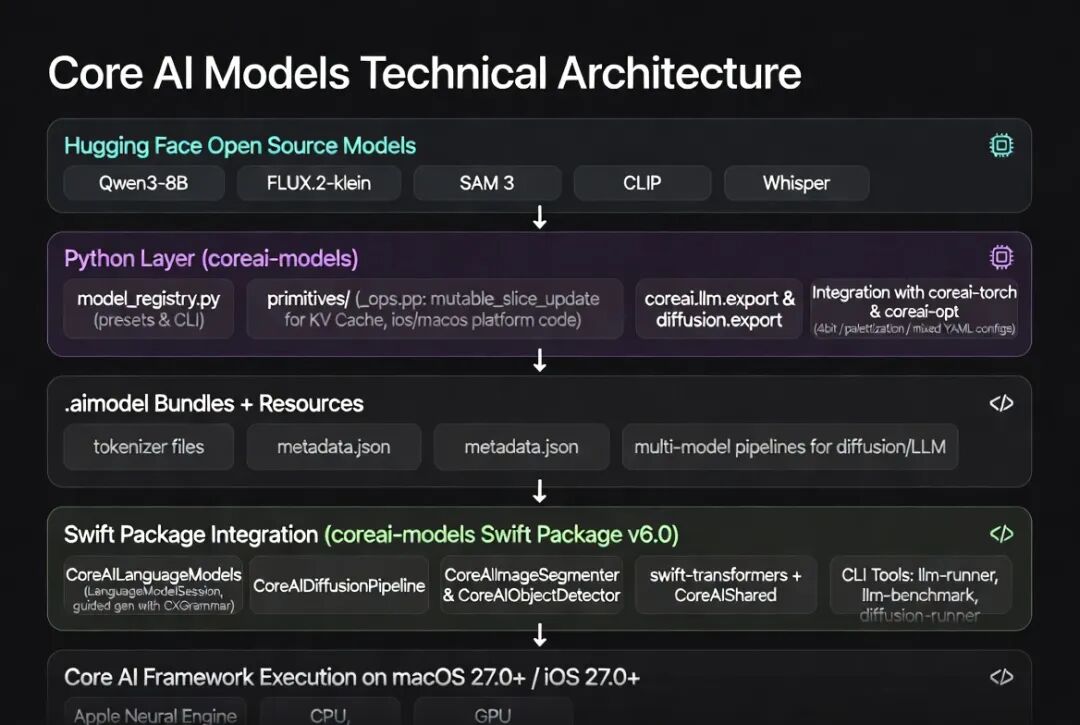
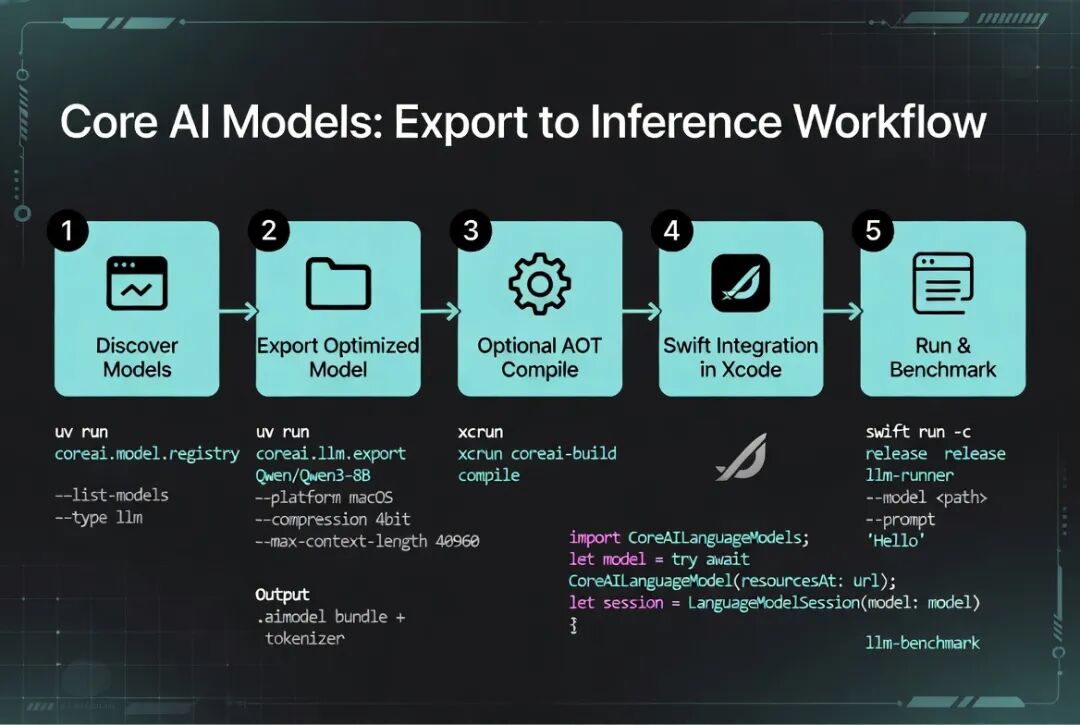
1.Export 阶段(Python):HF 模型加载 → 应用 primitives(mutable_slice_update 等保证 tracing 兼容)→ coreai-torch 桥接导出 → coreai-opt 压缩 pass(4bit / palettization / mixed YAML)→ 序列化为 .aimodel(可能基于 MLProgram 或 Core AI 自定义 IR) + sidecar 资源(tokenizer 来自 swift-transformers 兼容格式、metadata.json)。
2.KV Cache 优化:自定义 op 允许生成循环中高效 in-place / slice 更新,避免 naive 实现的高内存开销,是长上下文设备推理性能的关键。
3.平台差异根源:macOS 资源充裕 → 动态 shape/KV cache;iOS 强调确定性与功耗 → 静态 shape + 更 aggressive 的 palettization + 固定 context。
4.Swift Runtime:轻量 wrapper 层,复用 HF tokenizer 生态,通过 CXGrammar 实现 guided generation(JSON mode、regex constraint 等高级特性),最终调用底层 Core AI framework 在 ANE/CPU/GPU 上执行高度优化 kernel。
5.压缩策略:weight-only quantization 简单快速;palettization(Apple 特有 codebook/聚类量化)在低 bit 下保留更多精度;mixed precision YAML 允许 per-layer 精细控制(embed/output head 更高精度)。
6.MoE 支持:registry preset + export 逻辑中特殊处理 sparse expert 激活与 routing。
整个设计体现了苹果“ curated + 高度优化 + 开发者友好 primitives + Agent 辅助”的工程哲学。
九、最佳实践、性能与常见问题
●先 dry-run + 小模型验证:--dry-run、--num-layers 1(调试用)。
●iOS 必须固定 context,macOS 可动态。
●量化影响:从模型卡 ppl 数据看,Qwen3-8B 4bit 质量损失很小(12.19 → 12.90),推荐默认 4bit/palettized。
●Benchmark 驱动优化:用 llm-benchmark 量化 tokens/s 与 latency。
●自定义模型:严格遵循 authoring rules + primitives,否则 export 易失败。
●资源管理:复杂 pipeline 注意 bundle 大小与 metadata 更新。
●AOT 编译:生产环境推荐 coreai-build compile 进一步优化启动与执行。
apple/coreai-models 是苹果在 on-device AI 领域的重要开源举措,不仅提供了即开即用的 Qwen3、FLUX.2、SAM 3 等顶级模型导出路径,更通过 primitives、registry、Swift 模块化运行时与 Agent skills,构建了一套完整的从 authoring 到部署的闭环工具链。对于追求隐私、低延迟、离线能力的开发者,尤其是想把国内大模型(Qwen 系列)高效落地到 Apple 生态的团队,价值极高。
下一步行动建议:
1.克隆仓库,用 uv run 导出你的第一个 Qwen3 或 FLUX.2 模型。
2.在 Xcode 中集成 Swift package,跑通 llm-runner。
3.安装 Agent skills,让 Claude 辅助你 authoring 自定义模型。
本文转载自微信公众号,如有侵权请联系删除。
- 标题: 苹果官方开源 Core AI Models ,开发者如何把 Qwen3/Mixtral/FLUX.2「塞」进 iPhone 与 Mac
- 作者: lxiol
- 创建于 : 2026-06-20 01:23:49
- 更新于 : 2026-06-20 01:23:49
- 链接: https://blog.lxiol.cn/2026/06/20/苹果官方开源-Core-AI-Models-开发者如何把-Qwen3MixtralFLUX2塞进-iPhone-与-Mac/
- 版权声明: 本文章采用 CC BY-NC-SA 4.0 进行许可。